You put your height, weight, age and activity level into a calculator. It gave you a number, you took 500 off it, and that became your daily target. Six weeks later the scale has barely moved, and the app still says you're in a deficit every day.
Something in that chain is wrong. The useful news is that you don't have to work out which link.
Close enough to start with, not close enough to trust for months. The best common formula, Mifflin-St Jeor, explained 71% of the variation in resting energy use among the 498 adults it was built from, and a later review warned of noteworthy errors
for individuals. On top of that sits an activity level you pick yourself and a food log that tends to run low. The fix is to check the number against your own results: three weeks or more of logged meals and weigh-ins.
#What a TDEE calculator actually does
TDEE stands for total daily energy expenditure: everything you burn in a day. No calculator measures it. They all make the same two-step estimate.
Step one is your resting burn. Most calculators, including ours and the Rekkon app, use the Mifflin-St Jeor equation. It was published in 1990 from measurements of 498 healthy adults, and it predicts resting energy use from four things: weight, height, age and sex. In that study it explained 71% of the difference between one person's resting burn and another's. The rest is whatever those four inputs can't see, such as how much of your weight is muscle.
Step two is a multiplier. The resting figure is multiplied by an activity factor, from 1.2 for sedentary up to about 1.9 for very active, that you choose from a list. That's a self-assessment, not a measurement.
So the number on the screen is an average for people of your size, scaled by your own opinion of how much you move. It's a sensible place to start. It isn't a fact about you.
#How far off can it be?
In 2005 a systematic review in the Journal of the American Dietetic Association compared the common equations against measured resting metabolic rate. Mifflin-St Jeor came out the most reliable: it landed within 10% of the measured value in more people than any other equation, with the narrowest range of error. The same review still warned that noteworthy errors and limitations exist when it is applied to individuals
, and that older adults and US ethnic minorities were under-represented in the studies behind these formulas.
Take within 10%
at face value. A resting estimate that's 10% out carries straight through the multiplier, so for someone who burns about 2,400 calories a day (roughly 10,000 kJ) that's 240 calories. If you're aiming for a 500-calorie deficit, half of it can be gone before you've eaten anything, and that's before the activity multiplier adds its own guess.
None of this makes calculators useless. It makes the number a hypothesis. The test is what happens to your weight when you eat to it.
#Your food log is the other half
The calculator is one side of the sum. What you ate is the other, and that side leans in a known direction.
A British Journal of Nutrition review of validation studies found that around 30% of people misreport their intake whatever method they use, with the median under-estimate of energy running from about 12% to 18%. Weighing food didn't fix it. (We've covered that in how accurate voice logging is, and the photo version in the NIH test of AI calorie apps.)
The study behind it's not your metabolism
In 1992 the New England Journal of Medicine published a study of ten people who couldn't lose weight on diets they reported as low in calories. When researchers measured what they actually ate and burned, their energy expenditure was within 5% of predicted. They had under-reported their food by an average of 47% and over-reported their activity by 51%. It was an extreme group, chosen because their diets weren't working, but it's the clearest demonstration of a pattern larger reviews keep finding. Source: Lichtman et al., 1992.
Under-reporting isn't lying. It's the oil in the pan, the second coffee, the handful while cooking and a generous idea of a cup of rice. Nearly everyone does it, including people who weigh their food.
#You don't need to know which one is wrong
Here's the part that makes this fixable. From the outside, a formula that's 15% too high and a log that's 15% too low look identical: the app says deficit, the scale says maintenance. You can't separate them without a laboratory.
You don't have to. What you need isn't your true metabolism. It's the number that makes your log and your scale agree, because that's the number your target should be built on. Call it your burn as you log it.
If you log 1,900 calories a day and your weight holds steady, then for you, as you log, maintenance is 1,900. It doesn't matter whether a laboratory would say you ate 2,200 and burned 2,200. A target set 500 below your 1,900 will produce roughly the loss the plan promised, as long as you keep logging the way you have been.
That condition is why consistency beats precision. A log that's always 15% light is a perfectly good instrument. A log that's accurate on weekdays and missing on weekends is not.
#How to check your own number by hand
You need two things over the same stretch of at least three weeks: your average logged calories per day, and how much your weight changed.
1. Weigh in the same way each time. Same scale, first thing in the morning, at least once a week. Weight follows a weekly rhythm: in a study of 80 adults who recorded their weight daily, it was highest on Sunday and Monday and fell through the working week. Compare a Monday with a Friday and you're measuring the weekend, not fat.
2. Log most days, weekends included. Aim for at least four days in five. If the days you skipped were mostly Saturdays, keep logging and come back to it.
3. Do the sum.
Your burn as you log it
Average logged calories per day, plus kilograms lost × 7,700 ÷ number of days. If you gained weight, subtract instead.
Say you logged an average of 1,900 calories a day for six weeks and your weight went from 88.0 kg to 87.4 kg. That's 0.6 kg in 42 days, and 0.6 × 7,700 ÷ 42 is 110 calories a day. Your burn as you log it is about 2,010 calories (8,400 kJ). If the calculator said 2,400, your 1,900 target was never a 500-calorie deficit. It was closer to 100.
The 7,700 is the usual energy value given to a kilogram of body weight (about 32,200 kJ), the metric form of 3,500 calories a pound
. It's an approximation too: modelling by Kevin Hall at the US National Institutes of Health found it roughly holds for people carrying more body fat and overstates the deficit needed for leaner people. Over a few weeks, it's good enough to show which way you're off and roughly how far.
4. Move in small steps. Shift your target 100 to 150 calories toward the new number, hold for a fortnight, and check again. Three weeks of data is still noisy, and a small step costs little if the estimate was a bit out.
#Where this goes wrong
The same maths that corrects a target can wreck one.
Patchy logs. If the days you skip are bigger than the days you log, and they usually are, your average comes out low. The sum then says you burn less than you do and pushes your target down, punishing the days you logged for the ones you didn't. That's the weak point of any tracker that adjusts your target for you, and the argument at the centre of our MacroFactor comparison.
Too little time. A week of weigh-ins is mostly water. One salty dinner the night before the second reading can hide a fortnight of fat loss.
Big moves. A 400-calorie cut on the strength of one calculation is how people end up tired, hungry and ready to quit. If you've stalled after months of dieting, read what to do about a plateau first.
#What Rekkon does now
Rekkon now runs this check for you. Until this version, your target came straight from the formula. I've argued on this blog that an adjusted target isn't worth much if the log behind it is patchy, and I still think so. So the version I've built is cautious: it corrects the formula from your own meals and weigh-ins, and it would rather do nothing than guess.
Before it moves anything, it needs:
- At least three weigh-ins, the first and last at least three weeks apart and the latest within the past fortnight. A weigh-in is just updating your weight in the app.
- About four days in five logged between them. A day counts once it reaches 60% of your typical day, so breakfast alone isn't a full day.
- Weekends too: at least three weekend days in five.
- Strong evidence. If your results are close to what the formula predicted, nothing changes.
Days you didn't log are assumed to be bigger than your usual days, not average ones, so gaps can't talk your target down.
When it does move:
- 150 calories at most (about 630 kJ) per step, and at least a fortnight between steps.
- Never more than 15% from the formula, and it goes both ways: lose faster than planned and your target goes up.
- Only first thing in the day, so your target never shifts halfway through the afternoon.
- Back toward the formula if three months pass without enough data to keep checking.
The app's floor still applies: a weight-loss target never goes below 1,200 calories a day, tuned or not.
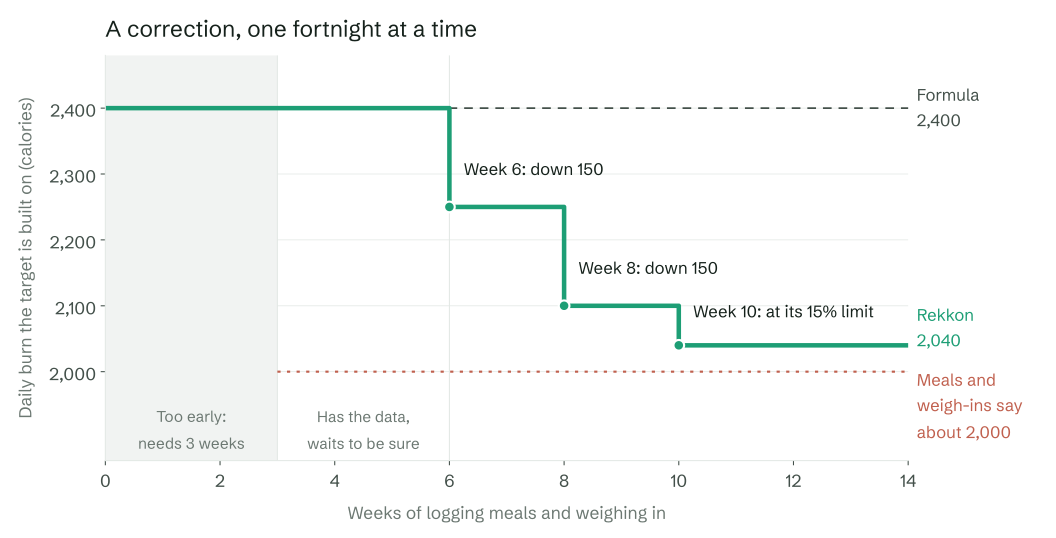
The chart follows the example above: the formula says 2,400 and the results say about 2,000. Three weeks is the earliest Rekkon can form a view, and here it waits until week six to be sure. It steps down 150, then another 150 a fortnight later, then stops at 2,040, 15% below the formula. The daily target follows, from 1,900 to 1,750, 1,600 and 1,540, where the deficit is finally close to the one the plan asked for.
When your target changes, a note on Today says what it was, what the change is based on and where to switch it off. It's on by default. In Settings, Tune my target to me
has one line under it saying where things stand: how many weigh-ins it still needs, or how far it has tuned you from the formula. The coach knows too, so you can ask it why your target changed.

Before it shipped, the rules were run against simulated people, 300 six-month runs of each kind. People whose formula and logs were already right were left alone in 96% of runs. People who skipped most weekends, or logged about four days in seven, were never tuned at all. The weak spot was a very noisy scale, where about one run in five saw a step it didn't need. Simulated people aren't real ones, which is why it moves slowly and has an off switch.
A target that checks itself.
Say what you ate and update your weight now and then. Rekkon works out the number that fits you, 150 calories at a time.
Try Rekkon free#What it doesn't do
It doesn't measure your metabolism, and it never tells you your metabolism is slow or your logging is wrong. It can't tell those apart, and it doesn't need to.
It doesn't replace a tracker built around this idea. MacroFactor updates its expenditure estimate continuously and adjusts your targets at a weekly check-in, and its modelling is more developed than mine. If the algorithm is the reason you track, MacroFactor is still the better tool.
And it doesn't need anything from you. Never weigh in, and your target stays on the formula while the rest of the app works exactly as it did.
#Common questions
How accurate are TDEE calculators?
Good enough to start with, not exact. The best common formula, Mifflin-St Jeor, explained 71% of the variation in resting energy use among the 498 adults it was developed from, and a 2005 systematic review found it within 10% of measured resting metabolic rate in more people than any other equation, while warning of noteworthy errors for individuals. The activity multiplier you choose yourself adds more uncertainty.
Why am I not losing weight in a calorie deficit?
Usually because the deficit on paper isn't the deficit in practice: the calculator overestimated what you burn, your log is running low, or both. A review of validation studies found people under-report energy intake by a median of roughly 12 to 18%. If your weight has been steady for three weeks or more, your average logged intake is your maintenance, whatever the calculator said.
How do I calculate my real TDEE from my weight and calories?
Over at least three weeks, take your average logged calories per day and add your weight loss in kilograms × 7,700 ÷ the number of days (subtract if you gained). For example, 1,900 calories a day with 0.6 kg lost over 42 days gives about 2,010. It only works if you logged most days, weekends included, and weighed in the same way each time.
Does Rekkon adjust my calorie target automatically?
Yes, cautiously. Once you have at least three weigh-ins spanning three weeks and about four days in five logged, weekends included, Rekkon compares your logged meals with your weight change and corrects its formula: at most 150 calories at a time, no more than once a fortnight, never more than 15% from the formula. A note on Today tells you when it changes, and you can switch it off in Settings.